
A Complete Guide to Computer Repair
Signs You Need Computer Repair
Recognising early warning signs can prevent minor issues from becoming major problems. Here are the most common indicators your computer needs professional attention:
Performance Issues
• Extremely slow startup or shutdown
• Frequent freezing or crashing
• Programs taking forever to load
• Unresponsive to commands
Hardware Symptoms
• Strange noises (clicking, grinding)
• Overheating or excessive fan noise
• Screen flickering or display issues
• Won't power on or random shutdowns
Software Problems
• Persistent error messages
• Blue screen of death (BSOD)
• Programs crashing repeatedly
• Operating system won't load
Security Warnings
• Virus or malware detection
• Unexpected pop-ups or ads
• Browser redirects to unknown sites
• Unfamiliar programs running
Common Computer Problems & Solutions
1. Computer Won't Turn On
Symptoms: No lights, no fans, completely unresponsive
Possible Causes: Power supply failure, motherboard issues, loose connections, dead battery (laptops)
Solutions:
Check power cable and outlet
Test with different power supply
Remove and reseat RAM modules
Professional diagnosis for motherboard issues
2. Slow Performance
Symptoms: Sluggish response, long load times, delayed actions
Possible Causes: Insufficient RAM, failing hard drive, malware, too many startup programs
Solutions:
Upgrade to SSD for dramatic speed improvement
Add more RAM (8GB minimum, 16GB recommended)
Remove unnecessary startup programs
Run virus scan and malware removal
Clean temporary files and optimize disk
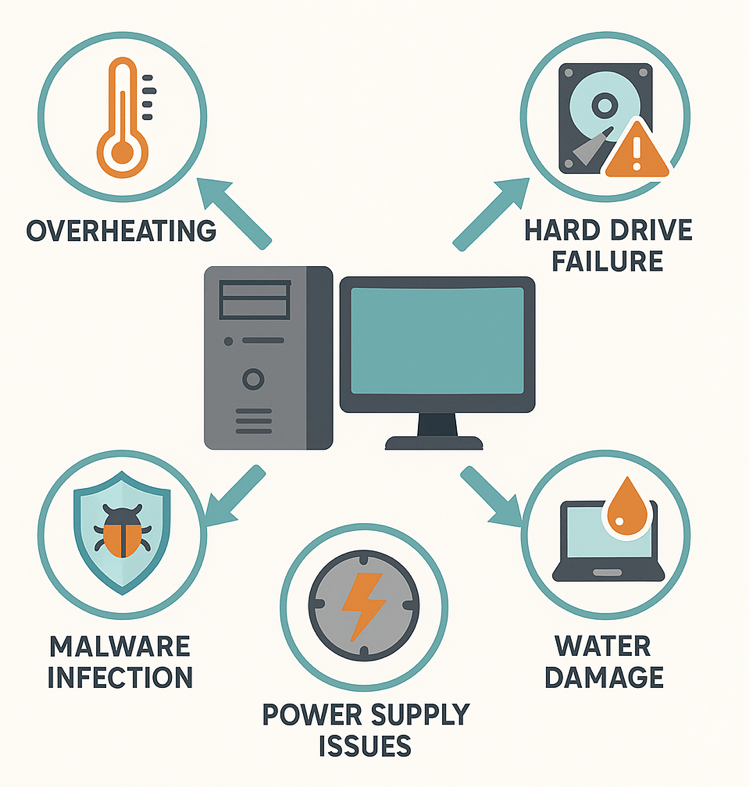
3. Overheating
Symptoms: Hot to touch, loud fan noise, random shutdowns
Possible Causes: Dust buildup, failing cooling fan, dried thermal paste, blocked vents
Solutions:
Professional cleaning of internal components
Replace thermal paste on CPU/GPU
Repair or replace cooling fans
Ensure proper ventilation around computer
4. Blue Screen of Death (BSOD)
Symptoms: Blue screen with error code, automatic restart
Possible Causes: Driver conflicts, hardware failure, corrupted system files, RAM issues
Solutions:
Note error code for diagnosis
Update or rollback recent drivers
Run memory diagnostic test
Check for Windows updates
Professional diagnosis if persists
5. No Internet Connection
Symptoms: Can't connect to WiFi, "No Internet" message, limited connectivity
Possible Causes: Network adapter issues, driver problems, router issues, settings misconfiguration
Solutions:
Restart router and modem
Update network adapter drivers
Reset TCP/IP stack
Run Windows Network Troubleshooter
Check for hardware failures
Hardware Repairs Explained
Hard Drive / SSD Replacement
Hard drive failure is one of the most common hardware issues. Modern SSDs are significantly faster and more reliable than traditional hard drives.
Upgrade Recommendation: If your computer has a traditional hard drive, upgrading to an SSD can make it feel like a brand new machine. Typical speed improvement is 5-10x faster.
Typical Cost: £185 - £240 including installation and data transfer
Repair Time: 1-2 days (including data transfer)
RAM Memory Upgrade
Adding more RAM is the most cost-effective upgrade for improving multitasking and overall performance. We recommend 8-16GB for modern usage.
Typical Cost: £75-£200 depending on amount and type
Repair Time: Same-day service available
Screen Replacement (Laptops)
Cracked or damaged laptop screens can be replaced. We stock screens for most major brands including Dell, HP, Lenovo, and ASUS.
Typical Cost: £150-400 depending on laptop model and screen type
Repair Time: 2-5 business days
Power Supply Replacement
Failed power supplies are a common cause of computers not turning on. We use high-quality replacement units with proper wattage ratings.
Typical Cost: $80-200 including installation
Repair Time: 1-2 business days
Motherboard Repair/Replacement
Motherboard issues are complex and often require professional diagnosis. Depending on the computer's age and value, replacement may or may not be economical.
Typical Cost: £200-£600 for laptops, £150-£400 for desktops
Repair Time: 3-7 business days
Software Issues & Fixes
Virus & Malware Removal
Professional virus removal includes deep scanning, removal of infected files, browser cleanup, and preventive measures to avoid reinfection.
Complete system scan with professional tools
Removal of trojans, spyware, adware, and ransomware
Browser cleanup and extension review
Security software installation and configuration
Education on safe browsing practices
Typical Cost: £60-£90
Repair Time: Same day to 24 hours
Operating System Reinstallation
A fresh Windows installation can resolve persistent software issues and significantly improve performance. We back up your data, reinstall Windows, and restore your files.
Typical Cost: £120
Repair Time: 1-2 business days
Data Backup & Recovery
Professional data recovery can save irreplaceable files from failing drives, accidental deletion, or corruption. Success rates vary by damage severity.
Important: If you suspect drive failure, stop using the computer immediately. Continued use can make data unrecoverable.
Typical Cost: £120 - £500+ depending on complexity
Repair Time: 2-7 business days
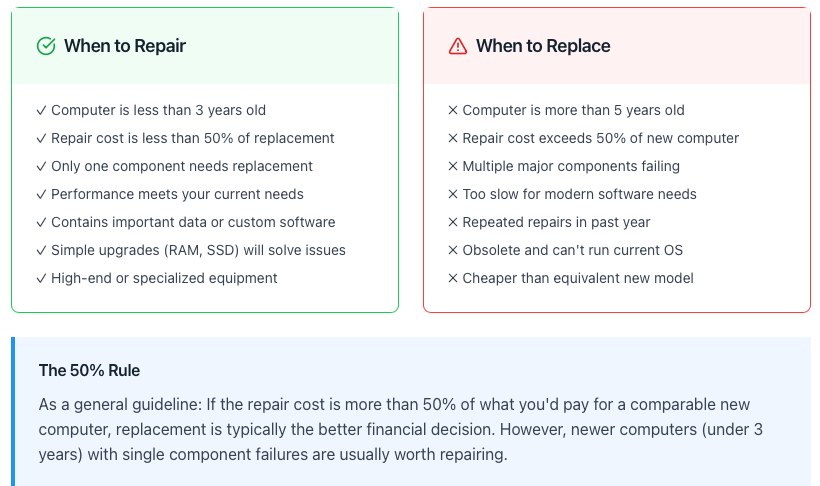
Repair vs. Replace Decision Guide
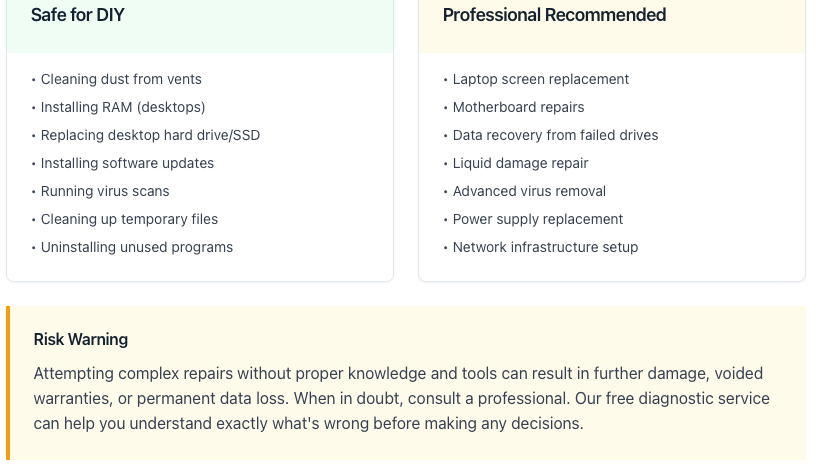
DIY vs. Professional Repair
Preventive Maintenance Tips
Regular maintenance can prevent most computer problems and extend your computer's lifespan significantly:
Daily Best Practices
Shut down properly (don't force power off)
Use a surge protector
Keep liquids away from your computer
Don't block ventilation vents
Practice safe browsing habits
Weekly Maintenance
Restart your computer at least once
Check for and install Windows updates
Empty recycle bin and temp files
Run quick antivirus scan
Check available disk space (keep 20% free)
Monthly Maintenance
Run full antivirus scan
Update all software and drivers
Check for unusual programs or processes
Clean keyboard and screen
Backup important files
Annual Maintenance
Professional cleaning of internal components
Replace thermal paste on CPU (for optimal cooling)
Check all physical connections
Test battery health (laptops)
Review and update backup strategy
Schedule a Repair
Book an appointment for your computer repair - convenient online scheduling
