There's a new Microsoft login scam!

Most online scams still revolve around one goal: stealing your password. We’re trained to watch for fake login pages, suspicious links, and urgent emails asking us to “verify” our account credentials.
But a new wave of Microsoft account attacks works differently. Victims log in on Microsoft’s real website, use real security checks, and even complete multi-factor authentication successfully—yet attackers still gain access.
This technique, known as device code phishing, doesn’t steal your password at all. Instead, it tricks you into granting access yourself, using Microsoft’s own authentication system exactly as designed.
Device code login is really useful
You've probably used it many times before:
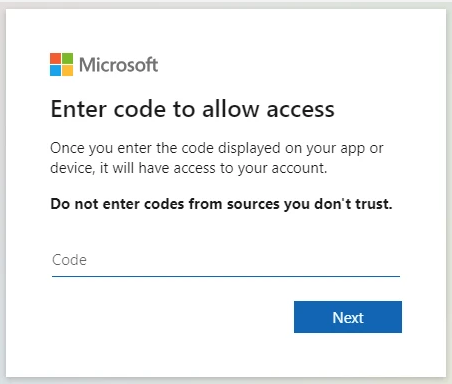
Microsoft, like other major tech companies, supports something called device authorization flow, which is also more commonly known as a device code login. But even more commonly than that, it's that moment when, instead of a full login page, you're shown a matching login code across your devices that you have to match or enter to complete the login process.
It's really handy, especially on devices that can't easily display a full login page or instances when you're connecting to a limited-use device. For example, you may have encountered these on your smart TV or when connecting to the TV in your hotel room — both are prime examples.
Most of the time, this process is completely safe, and nothing about the process is dangerous. But all that changes with a specific exploit.
Legitimate features can be used against you
It exploits a common assumption
Device code login is incredibly useful. However, it can be exploited because device login processes naturally assume that the person entering the code initiated the request. That's partially where the process breaks down.
If an attacker knows your email address or another piece of known contact data, they can initiate a device login request from their own device, starting a unique session. Then, Microsoft (and other tech companies) generates a legitimate device code tied to that session.
Here's where it gets tricky. Instead of attempting to use it themselves, the attacker can send the code directly to you, disguised as another process, many of which take familiar phishing tactics into consideration:
A security alert claiming suspicious activity
An urgent Microsoft 365 notification
Messages from Teams or an IT support message
Business or other email requests
The request directs you to visit an official Microsoft login page and enter the provided code to “secure” or “verify” their account. This is where the next stage of the exploit kicks in. You're not visiting a fake login page or a cleverly designed phishing portal: it's an actual Microsoft login page, and the authentication checks are real.
You provide the device code login like normal, approve the request, and feel like you've protected your account. But in reality, you've actually authenticated the attacker, handing over the keys to your account in the process.
In the whole process, your password is never exposed, yet you've directly handed over your account.
Why the device code login scam works so well
It's all about imitation
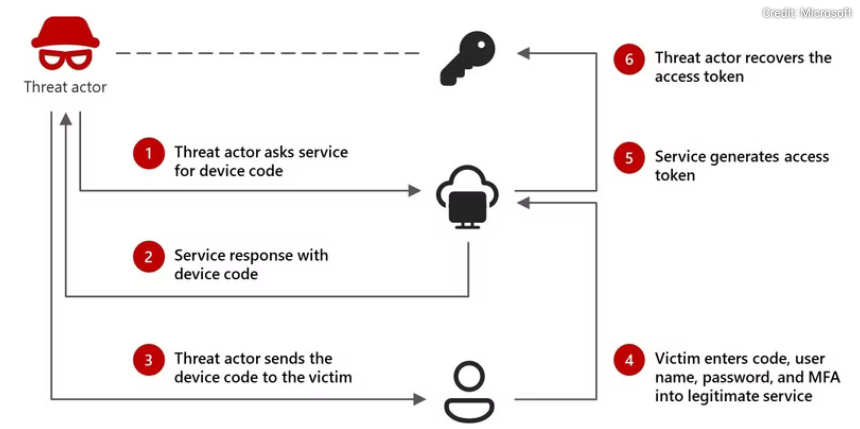
The biggest problem with device code login scams is that it skirts around most traditional phishing scam tactics. Phishing usually involves a cloned login page, a lookalike login page, or a system that intercepts credentials.
Whereas the device code login phishing scam skips over all of that, making everything appear above board and legit. Well, not even making it appear "above board" — it actually is, as you're interacting with the Microsoft authentication process. The whole scam works because all of the processes work exactly as they should; it's just been slightly reversed on you.
So, what can an attacker get with your access token?
Authenticating an attacker is obviously a bad situation
After authentication completes, Microsoft issues what's known as an access token, which functions like a temporary proof that the login has already been verified. Functionally, the system assumes the holder has already proven their identity, so it allows access without repeatedly asking for credentials.
Then, the answer to what an attacker can get their hands on really depends on the account targeted. For example, if your Outlook account is targeted, an attacker could gain access to your emails, then by extension, other services associated with the address (by resetting passwords, accessing 2FA codes, etc.).
But if your Teams login is targeted, an attacker could end up inside your company's Teams account, with access to the data held there.
So, how do you protect against device code phishing?
Constant, never-ending vigilance
Ultimately, the best defence against code device login attacks is to really try to understand how device login actually works. Even a base level of understanding of device login processes will protect you against this phishing attack.
In short, device login codes should only appear when you initiate a login on another device yourself. Microsoft will not randomly send you a code to secure your account, similar to how it'll never message you asking for your password, to confirm a 2FA code, and so on.
This isn't just Microsoft, mind. No company, techy or not, should ever ask you for this information. It's private and just for you.
In most cases, you can follow the common security rules for spotting phishing scams:
Never enter a login code sent through email, chat, or text messages.
Treat unexpected authentication requests the same way you would treat a password request.
If you receive an MFA prompt you didn’t trigger, deny it immediately.
Review Microsoft sign-in activity regularly for unfamiliar applications or sessions.
Remember, authentication codes are permissions, not verification steps. If you didn’t start the process, someone else did.